Debouncing in JavaScript

Often situations arise, when we want a certain event to fire off only after a certain amount of time has passed. The most common example would be the search bars we see on e-commerce websites like Amazon or Flipkart. In these search bars, when you type something, an API call is made, and results similar to your query are displayed on the screen.
Now imagine making an API call every time a key is pressed on your keyboard. Doesn't sound viable right? Firing an event continuously (in this case, the call to the API) would hamper the performance of the website.
This can be avoided by using the concept of debouncing. Debouncing limits the rate at which a function fires off. In the example above, it drastically reduces the number of API calls that are made to the server.
The setTimeout function of Javascript plays a vital role in implementing debouncing. For those who don't know what setTimeout does, it is a scheduling function provided by Javascript which allows us to run a task after a certain interval of time.
Let's see how we can implement debouncing with a simple example,
The very first thing we'll do here is - create a simple input in our HTML file. On this input box, we will call a method searchData() for the onkeyup event. So that every time the user releases the key after pressing it, searchData() is called.
<body>
    <label for="search">Search</label><br /><br />
    <input type="text" onkeyup="searchData()" />

    <script src="script.js"></script>
  </body>
In our Javascript file, we'll define the searchData() function and create a counter to track the number of times it gets called.
let counter = 1; // To track number of calls

const searchData = () => {
  // Let's say this function calls some API and gets us some data
  console.log("Looking for data..", counter++);
};
After running this program, we see something like this -
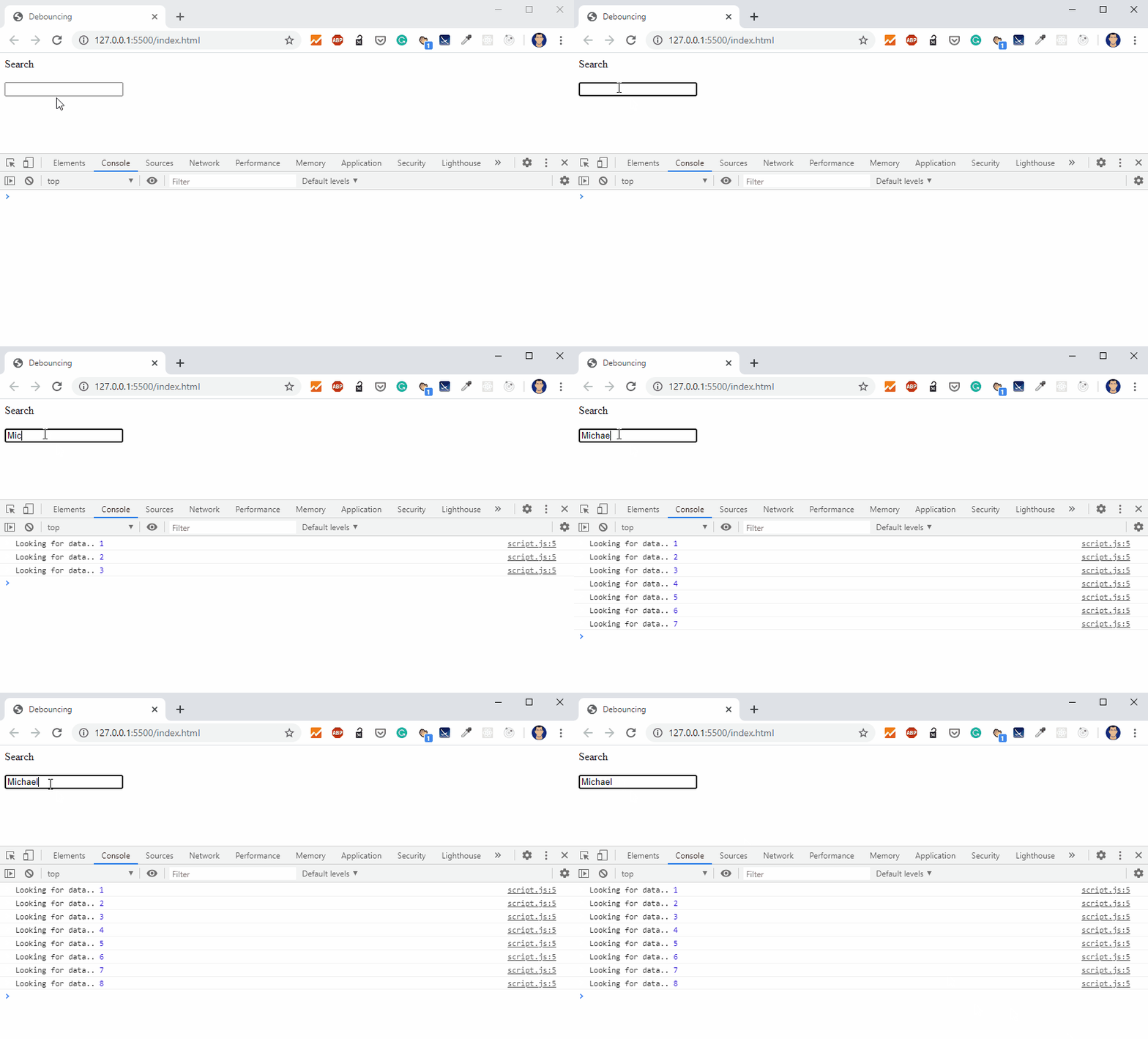
Notice how for every letter of the word "Michael", the function gets called. Imagine firing off API calls for a bigger query on a much bigger site. That would be very browser intensive and may hinder the performance. To reduce these continuous function calls, we'll make use of the debounce function :
let counter = 1; // To track number of calls

const searchData = () => {
  // Let's say this function calls some API and gets us some data
  console.log("Looking for data..", counter++);
};

// Debounce function
const debounce = function (fn, delay) {
  let timer = 0;
  return function () {
    clearTimeout(timer);
    timer = setTimeout(() => {
      fn();
    }, delay);
  };
};

const callDebounce = debounce(searchData, 300);
Note that we make a change in our HTML file and will be calling callDebounce() now instead of searchData()
<input type="text" onkeyup="callDebounce()" />
The code above will do the following -
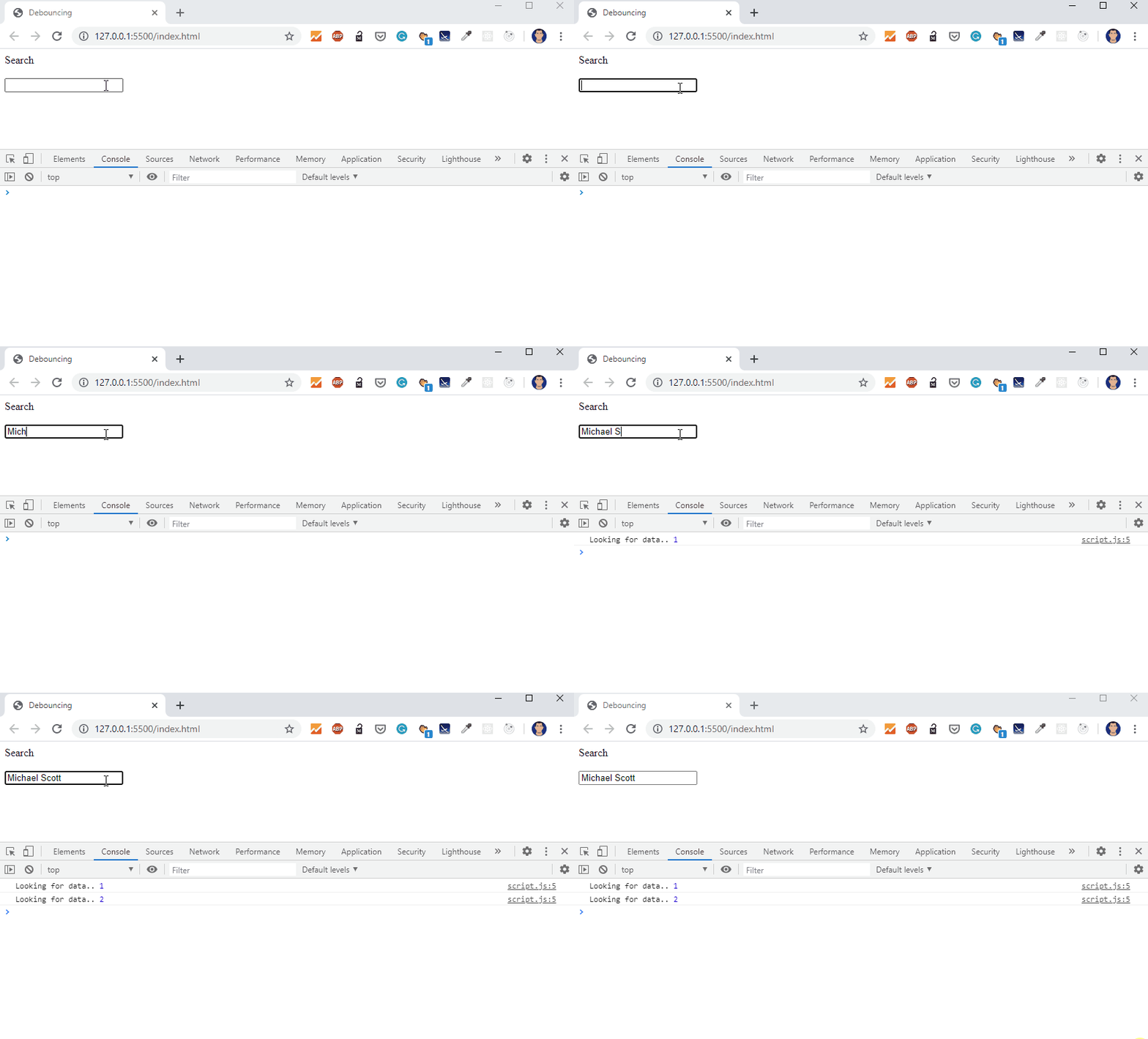
Notice how no call is made until a delay of 300ms is encountered. Instead of making more than a dozen calls for each letter in "Michael Scott", our input bar will only make calls whenever the delay between two keypresses is more than 300 milliseconds. In this case, 2 times.
When the user enters the first character "M", debounce() is triggered which waits for 300ms to fire off the searchData() function. But before 300ms have passed, the user enters another character which will wait another 300ms to fire off searchData() and so on. This will create multiple copies of the timer running in the background. So to clear out the timers in cases where consecutive keypresses are being made without a pause 300ms, we make use of the inbuilt clearTimeout() function. This sets the timer to 0.
This goes on until the user takes a pause after completing the word "Michael", this pause is noticed by the function which in turn fires off our searchData() function.
In simple words, what happens here is that the function waits 300 milliseconds after the last keypress. Only when 300ms have passed and no keypress has been made, it fires off the searchData() function.
Wrapping Up
This was a simple demonstration of debouncing. Using this we can reduce the number of calls made several times in succession by a function, which will ultimately lead to an improvement in the performance of our website.
If you liked what you read, consider following me on Twitter - @afraz_momin to stay updated. I plan on writing similar articles about JavaScript in the coming days!
About the author
Aspiring Polyglot, learning and getting better each day.
Comments
Join the discussionNo comments yet. Be the first to comment.