Event Bubbling and Event Capturing in Javascript

The interactivity of our HTML web page is handled by Javascript. This interactivity is nothing but a bunch of events that the HTML elements undergo. An event can be something the browser does or something a user does. They tell us some change has happened and where it has happened. It could an onClick event that indicates something has been clicked. Another instance could be an onSubmit event that says that the form has been submitted.
How well these events are handled decide how user-friendly the web page is.
Event Bubbling and Event Capturing are two phases of event propagation/flow in Javascript. Event flow is basically the order in which the events are received on a web page. In Javascript, event flow takes place in three phases -
- Capture Phase
- Target Phase
- Bubble Phase
This propagation is bidirectional, from the window to the target and back. What differentiates these phases is the type of listeners that are called.
Let's start by understanding Bubbling first.
Event Bubbling:
Bubbling is the flow of events where, when an event takes place on an element, it first runs the handler on itself, then on its parent and then on all of its ancestors.
It basically moves up the hierarchy from the innermost element to the outermost element.
This can be better understood by taking an example -
<body>
    <div id="grandparent">
      <p>Grandparent</p>
      <div id="parent">
        <p>Parent</p>
        <div id="child">
          <p>Child</p>
        </div>
      </div>
    </div>
    <button onClick="history.go(0)">
      Reset Elements
    </button>
  </body>
In our HTML file, we take 3 divs nested one inside the other and give them ids of child, parent, and grandparent starting from the innermost div.
Add a bit of styling
div {
  min-width: 75px;
  min-height: 75px;
  padding: 25px;
  border: 1px solid black;
}

button {
  margin-top: 20px;
  width: 200px;
  font-size: 14px;
  padding: 10px;
}
We will set a click event on each of the 3 divs in our JS file
document.querySelector("#grandparent").addEventListener("click", () => {
  document.querySelector("#grandparent > p").textContent =
    "Grandparent Clicked!";
  console.log("Grandparent Clicked");
});

document.querySelector("#parent").addEventListener("click", () => {
  document.querySelector("#parent > p").textContent = "Parent Clicked!";
  console.log("Parent Clicked");
});

document.querySelector("#child").addEventListener("click", () => {
  document.querySelector("#child > p").textContent = "Child Clicked!";
  console.log("Child Clicked");
});
The code above will perform in the following way -
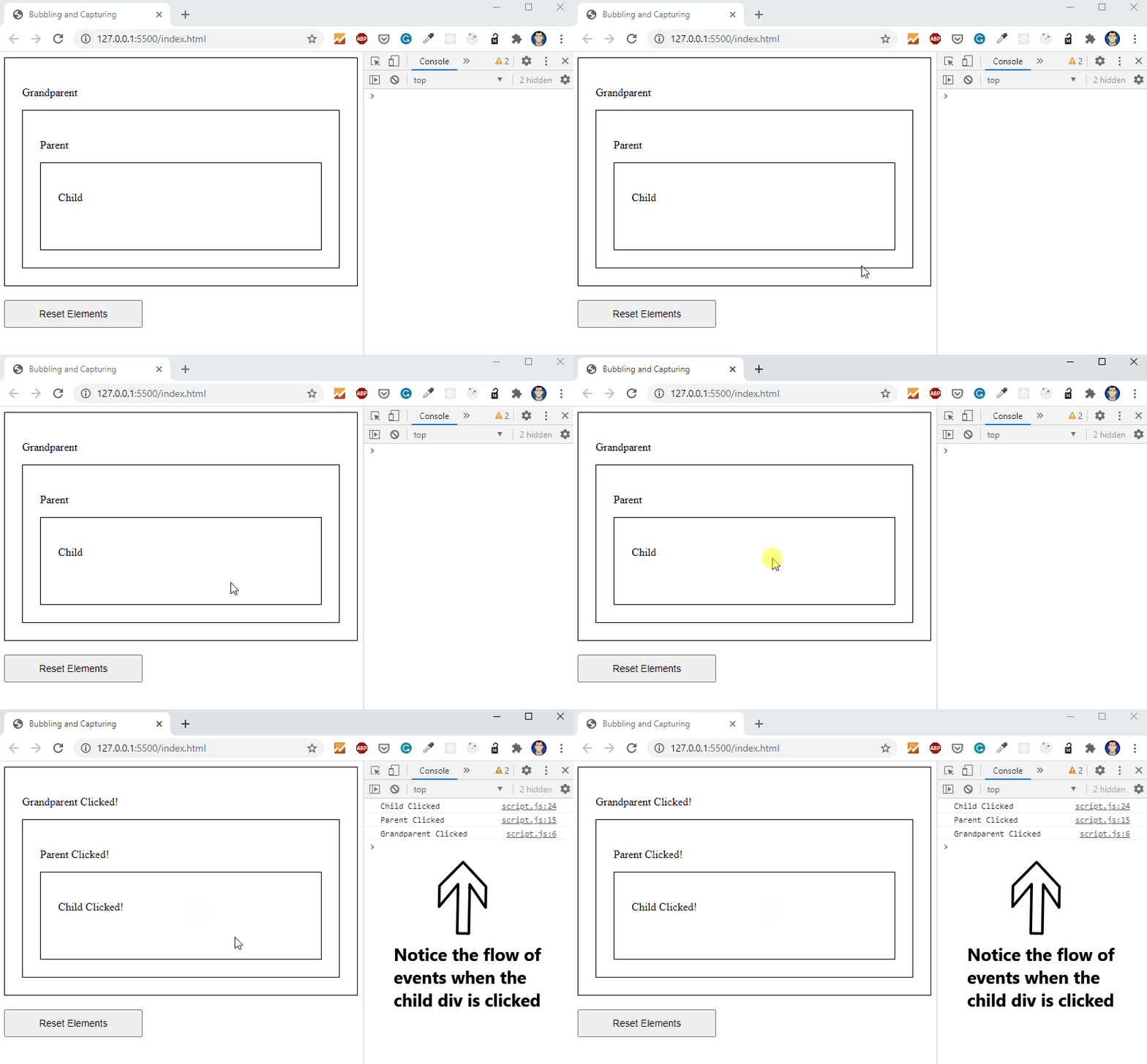
Notice how, even when the child div is clicked, the handlers on all its ancestors get triggered as well. Similarly, when the parent div is clicked, the handler on the grandparent div will get fired as well. But, keep in mind, in this example, the handler on the child div won't be triggered.
Although, what's more important here is the way the event flow happened. It started from the innermost element, i.e. is the child div and then propagated up the hierarchy eventually reaching the parent and grandparent divs (in that order strictly).
This type of flow of events is called Event Bubbling.
Event Capturing:
The capturing principle is the exact opposite of bubbling. In Event Capturing, the event propagation takes place from the outermost element to the innermost element. Event capturing is sometimes also referred to as event trickling.
We often use the addEventListener() when working with Javascript, in which we usually pass two parameters -
the event
the callback function
The addEventListener() function also takes a 3rd hidden parameter - useCapture which takes a boolean value. This useCapture parameter is set to default by false. Setting it to false, makes our events propagate using the principle of Bubbling. Setting it to true will make them propagate in a top-down approach, that is, Capturing.
To implement event capturing we will make a few small changes to our JS code -
document.querySelector("#grandparent").addEventListener("click", () => {
  document.querySelector("#grandparent > p").textContent =
    "Grandparent Clicked!";
  console.log("Grandparent Clicked");
},true); // useCapture parameter is now set to true

document.querySelector("#parent").addEventListener("click", () => {
  document.querySelector("#parent > p").textContent = "Parent Clicked!";
  console.log("Parent Clicked");
},true); // useCapture parameter is now set to true

document.querySelector("#child").addEventListener("click", () => {
  document.querySelector("#child > p").textContent = "Child Clicked!";
  console.log("Child Clicked");
},true); // useCapture parameter is now set to true
Now our code will run in the following way -
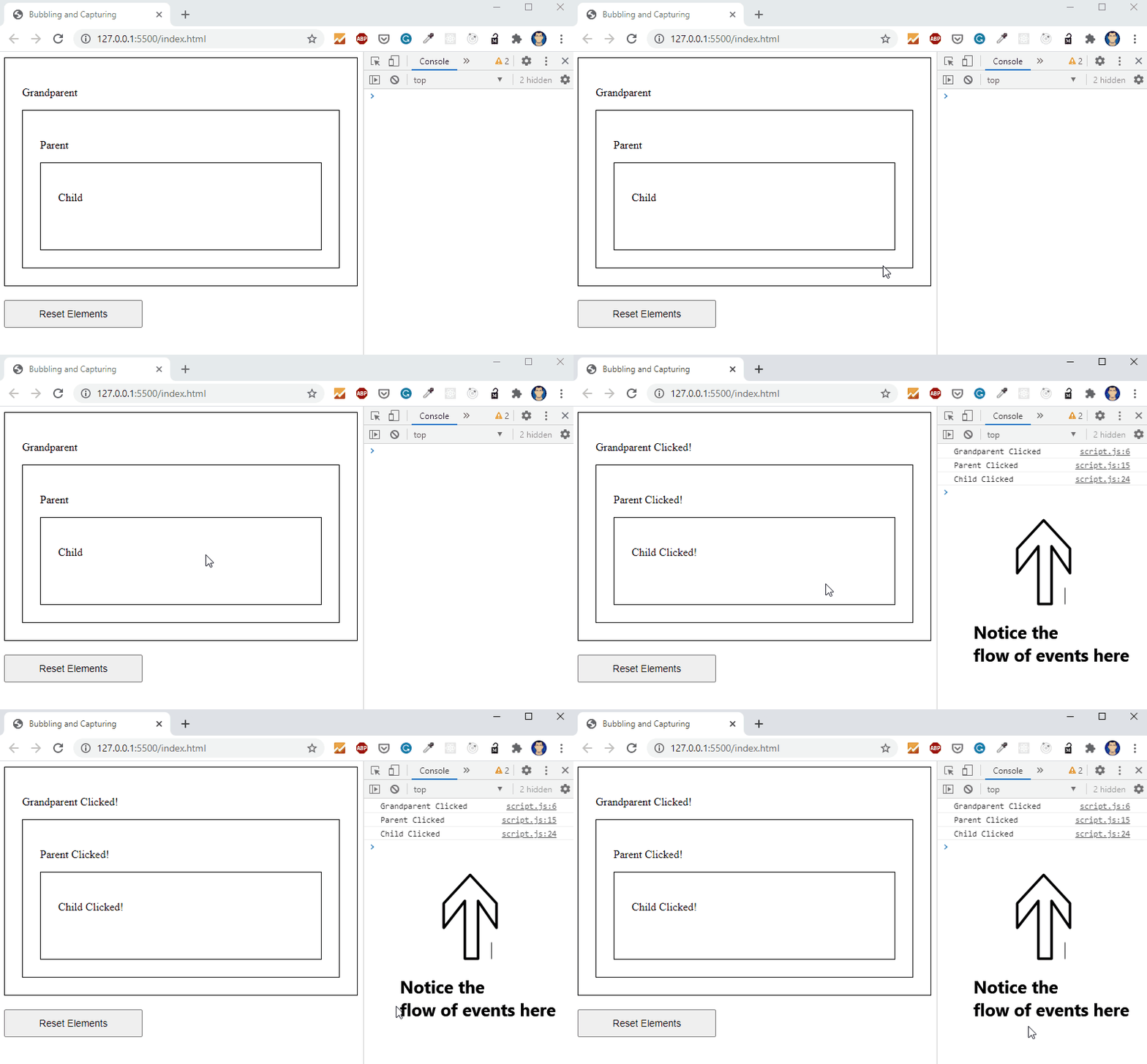
Notice how the flow of events now propagates from the outermost element to the innermost element.
i.e grandparent -> parent -> child
This flow of events is called Event Capturing.
Wrapping Up
The reason I spoke about bubbling first is because event capturing is rarely used. It is set to false by default. For most of the browsers, Event bubbling is the default way of event flow.
Javascript helps us make interactive web applications. It makes use of a lot of user-generated events in doing so. The user experience of a website depends on how well these events are handled. Hence it is important to know how events work and the flow behind them.
Here's the link to the Codepen, if you want to demonstrate this yourself.
If you liked what you read, follow me on Twitter - @afraz_momin to stay updated. I plan on writing similar articles about JavaScript in the coming days!
About the author
Aspiring Polyglot, learning and getting better each day.
Comments
Join the discussionEvent bubbling still amazes me sometimes, you know you can add pointer-events: none on the parents to not have them trigger?
Oh yeah, I'm aware. We can achieve that using the stopPropagation() method.
Event bubbling/capturing is definitely one of the many awesome concepts of Javascript.